Before generating your video, it's important to establish a clear visual style.
An Al video style guide helps ensure consistency across every scene, character, and shot.
In this section, you'll build a mood board to define the look and feel of your project using colors, typography, reference images, and inspiration from films, photography, and other visual media. You'll then generate scene
environments and set designs, create consistent characters that can be reused throughout your video, and develop a detailed Al-generated shot list to guide production.
By defining these creative elements upfront, you'll create a strong visual foundation that makes the entire Al video production process faster, more consistent, and more professional.
Define the visual style of your video by collecting colors, fonts, textures, and reference images that capture the desired mood and aesthetic.
Generate the environments and locations for your video to establish a consistent world and visual backdrop for your story.
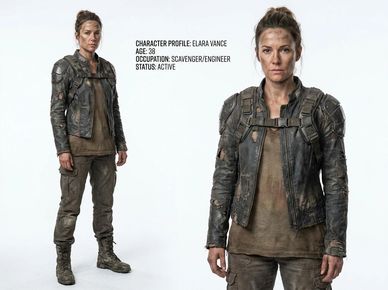
Create and refine your characters to ensure they remain visually consistent across every scene and shot throughout the video.
This scene follows a lone female survivor moving through a vast, abandoned futuristic city at night or dawn. The world around her is empty and decayed, with collapsed skyscrapers, overgrown structures, and flickering neon signs cutting through thick atmospheric fog. The environment feels silent and lifeless, emphasizing total isolation.
As she walks through the ruins, she is searching for a specific building hidden somewhere within the city. Her movement is cautious and focused, driven by uncertainty and survival. The camera follows her in slow, cinematic tracking shots that highlight the scale of the environment and her small presence within it.
The scene is designed as a continuous, atmospheric sequence with no dialogue, relying entirely on visuals, mood, and sound design to convey tension, mystery, and emotional weight.
MOOD: Isolation, quiet tension, survival, mystery
STYLE: Cinematic sci-fi, dystopian, photorealistic, fog-heavy, neon-lit decay
STRUCTURE: Single continuous shot (1–2 minutes), slow pacing, minimal action

Choose a color palette that defines the mood, emotion, and visual identity of your video.

Gather textures and visual elements that add depth, atmosphere, and personality to your world.

Select typography that complements your video's style and strengthens its overall visual branding.

Collect frames from films, TV shows, artwork, or photography that capture the look, mood, and storytelling style you want to achieve.
Use AI image generation to create the environments and locations that will serve as the backdrop for your video. Building your sets before production helps establish a consistent visual world, making it easier to generate cohesive scenes and maintain the same style throughout your project.
Example Set Prompt
"A vast futuristic city in ruins, towering skyscrapers partially collapsed and overgrown with vegetation, abandoned streets covered in debris and puddles reflecting vibrant neon signs. Flickering holographic advertisements illuminate the fog-filled streets with blue, purple, and red light. Atmospheric rain, cyberpunk aesthetic, cinematic composition, dramatic lighting, dense urban decay, realistic textures, post-apocalyptic future, ultra-detailed environment, movie-quality concept art, no people, 16:9 widescreen."
Example Interior Set Prompt
Inside a vast abandoned futuristic building corridor in a dystopian sci-fi world. The hallway is long, narrow, and partially collapsed, with cracked concrete walls, exposed metal framework, and broken panels. Thick layers of dust cover the floor, scattered debris, and remnants of past occupants. Flickering emergency lights cast faint red and blue glows through the fog-filled air. Dust particles float visibly in the light beams. The space feels silent, eerie, and forgotten, with deep shadows stretching into darkness at both ends of the corridor. Ultra-detailed environment, cinematic lighting, post-apocalyptic atmosphere, realistic textures, sci-fi horror aesthetic, movie still, 16:9 widescreen, no people.


Create your main characters before generating scenes so you can maintain a consistent appearance, clothing, and personality throughout your video. A well-defined character reference makes it easier to generate matching images and videos across different shots, scenes, and AI tools.
Example Character Prompt
"A rugged female survivor and scavenger named Elara Vance, 38 years old, standing confidently in a post-apocalyptic future. Weathered face with subtle dirt and battle scars, determined expression, brown hair tied in a practical messy bun. Wearing a worn dark leather jacket with torn sections, reinforced shoulder armor, tactical backpack harness, faded brown shirt, distressed cargo pants, and heavy combat boots. Realistic survival gear, practical scavenger aesthetic, grounded science-fiction design, cinematic character sheet, full-body view, neutral background, ultra-detailed skin and clothing textures, photorealistic, movie-quality concept art, highly realistic lighting, character reference sheet, front-facing, 16:9."
Character Consistency Prompt Add-On
Maintain the exact same character appearance, facial features, hairstyle, clothing, age, proportions, and outfit details as the reference image. Do not change clothing, hair color, facial structure, or accessories. Ensure character consistency across all generated scenes and camera angles.

Character Reference Sheet

Character Close-up

Key elements/ingredients
EXT. RUINED FUTURISTIC CITY – NIGHT / DAWN (AMBIENT LIGHT)
A vast, silent futuristic city stretches into the distance. Towering skyscrapers stand broken and abandoned, their surfaces cracked and overgrown with faint traces of vegetation and decay. Neon signs flicker weakly through thick fog, casting soft blue and purple reflections across wet, shattered streets.
A lone FEMALE SURVIVOR walks slowly through the empty city. Her movements are cautious, deliberate. She keeps her eyes scanning the environment, searching for a specific building hidden somewhere in the ruins.
The soundscape is minimal—just wind, distant electrical hums, and the faint crackle of dying holographic signage.
She pauses briefly, looking up at the skyline, trying to orient herself. In the distance, a partially collapsed structure flickers with unstable neon light, possibly the building she is searching for.
She continues walking forward.
The camera remains in a slow, continuous tracking shot behind and slightly to the side of her, maintaining distance and scale. The city feels endless and lifeless around her, emphasizing isolation and survival.
No dialogue.
MOOD: Quiet tension, loneliness, post-apocalyptic mystery.
STYLE: Cinematic sci-fi, photoreal, atmospheric fog, shallow movement, long take.
DURATION: 1–2 minutes, continuous shot, no cuts.
A vast ruined futuristic city at dawn/night. Skyscrapers are broken, fog rolls through streets, neon signs flicker faintly. No people visible. Sets tone of isolation and scale.
Camera drops to street level showing the empty road stretching forward into the ruins. Debris, cracked pavement, and glowing reflections from neon lights establish environment depth.
Female survivor enters frame walking alone through the empty street. Camera tracks behind her at a distance, emphasizing scale of the city around her.
Camera moves closer to mid-distance behind her. Subtle movement shows her scanning surroundings while continuing forward.
From behind her shoulder looking ahead into the ruined city corridor. Shows long perspective of empty street and distant glowing structures.
Close-up of her face as she pauses briefly, observing the environment. Expression shows caution, focus, and uncertainty.
Her point of view scanning the city ahead. Broken buildings, flickering holograms, and fog-shrouded streets in the distance.
Cutaway of ruined architecture detail: collapsing skyscraper, flickering neon sign, drifting dust and rain hitting debris.
A partially illuminated building appears in the distance through fog. Subtle glow suggests possible destination.
Back on the character. She slightly adjusts her direction, indicating she has spotted something. Body language shows determination.
Camera follows her as she continues walking toward the distant structure. Atmosphere remains quiet and tense.
Camera slowly pulls back or rises, revealing her small figure in the vast empty city as she continues forward into the distance.
END SCENE
Notes:
Now that you understand how visual direction shapes an AI video, it’s time to build your own AI Video Style Guide. This guide will act as the creative foundation for your entire project, ensuring consistency across mood, scenes, characters, and shots.
Before generating anything, decide the overall look and feel of your video.
Use AI tools to help you explore and define:
Use AI image generation tools to build a moodboard that represents your visual identity.
Include:
Generate key environments that will form the world of your video.
Use AI to create:
Develop consistent character designs that can be reused across scenes.
Define:
Turn your idea into a structured sequence of visual moments.
Include:
Bring everything together into one reference document containing:
By the end of this task, you should have:
✅ A clear visual direction for your AI video
✅ A complete moodboard defining your style
✅ Generated environments and characters
✅ A structured shot list for production
✅ A unified AI Video Style Guide ready for storyboarding
This style guide will become the foundation for every image and video you generate in your project.
Now that your visual style is defined in the moodboard, the next step is to turn that direction into structured scenes.
Storyboarding is where your film starts to take shape. Here, we break your shot list into individual visual frames and generate AI images for each moment in your sequence. These storyboard images act as the first real version of your video, helping you see composition, pacing, character placement, and environment design in context.
This stage is where you refine your story—spotting missing shots, improving flow, and ensuring every scene works before moving into final AI video generation.
AI Video School
Copyright © 2026 AI Video School - All Rights Reserved.