Master AI Video Creation
Master the latest AI video tools and how to build amazing AI videos—no experience required.





Never miss an update, exclusive resource, or email-only offer—stay connected!

Learn the latest, cutting-edge AI tools for video creation, with constant updates to keep pace with the industry. Stay at the forefront of AI video innovation.

Explore over 20 AI tools and platforms covering video generation, image creation, image-to-video, text-to-video, script and idea development, image manipulation, AI music, how to keep consistency, AI speech and so much more.

Systematically designed for complete beginners to intermediate students. Through step-by-step sections, we’ll guide you through the AI production process, explaining what’s needed and how to create amazing videos. Follow along with projects at your own pace to build your skills.

We know everyone’s schedule and budget are different, which is why we’ve made our course available exclusively on Udemy.
Why Udemy?
✔ One-time purchase – Pay once and own the course for life.
✔ Lifetime access – Revisit lessons anytime with all future updates included.
✔ Huge discounts – Udemy frequently offers deals, so you can grab the course at the best price.
✔ 30-day money-back guarantee – No risk, just learning!
✔ instantly get full access to the entire course – Learn at your own pace!
By hosting our course on Udemy, we ensure you get the best value, flexibility, and ongoing updates—all in one place. Check it out today!
What's in the course, section by section?
Overview: Kick off your AI video journey with a course walkthrough, understand the top AI video tools available and see exclusive previews of the tools you'll learn, and access to all the resources (your course site pages) you'll need from day one.
Overview: Introduces the 3 key methods for AI video creation, explains essentials like prompting basics, styles, and ethical considerations.
Overview: See the entire AI video creation process from start to finish. Compare a quick workflow with a professional end-to-end workflow, then master every step as each section of the course builds on the last.
Overview: Learn brainstorming techniques, discover where to find inspiration, and use leading AI assistants to generate creative, high-quality video ideas. You'll see practical examples across a range of niches, giving you a repeatable framework you can apply to any project.
AI Tools Covered: ChatGPT, Gemini, Copilot, Perplexity, and Claude.
Overview: Turn great ideas into polished scripts with AI. Learn how to build engaging story structures, refine tone and style, and develop scripts for a variety of formats—from cinematic shorts and YouTube videos to educational and promotional content.
AI Tools Covered: ChatGPT, Custom GPTs, Claude (including creating a Claude Skill), Squibler, NotebookLM, and Gemini.
Overview: Learn how to create original AI-generated music, voiceovers, narration, and sound effects that bring your videos to life. You'll also cover copyright considerations, licensing, and best practices to ensure your audio is both high quality and safe to use.
AI Tools Covered: Suno, ElevenLabs, Filmora, and Kling.
Overview: Learn how to create mood boards, style guides, and visual references that give your AI videos a clear creative direction. You'll build character sheets, colour palettes, scene guides, and other visual assets to maintain consistency and ensure every generation matches your vision.
Overview: Bring your video ideas to life before production begins. Learn how to create storyboards, visualise scenes, and plan shot lists using AI image tools. Identify missing shots, refine your creative vision, and generate visual assets that can become part of your final video.
Overview: Take a deep dive into the leading AI image generation tools used to create professional video assets. Learn how to generate characters, environments, props, concepts, and visual elements that bring your AI videos to life—while understanding the strengths of each platform and when to use them.
AI Tools Covered: Midjourney, Nano Banana, ChatGPT/DALL·E, Kling, Adobe Firefly, Runway, Meta AI, Grok, and Seedream.
Overview: Master the leading AI video platforms for transforming ideas and images into dynamic, professional-quality videos. Learn how to create everything from short clips and cinematic sequences to complete multi-shot scenes with movement, audio, dialogue, and storytelling elements.
AI Tools Covered: Seedance, Runway, Google Veo/Omni, Kling, HeyGen, Midjourney Video, Meta AI, Grok, and NotebookLM.
Overview: See how to take your AI videos from generated clips to a finished production. Learn the fundamentals of the AI editing process (in any video editor), then explore advanced enhancement techniques: upscaling, preparing your videos for a professional final result.
AI Tools Covered: Topaz AI and ByteDance (in Higgsfield AI)
Overview: It’s time to put everything together. Follow along as we create a complete AI video from the first idea to the final edit, using the exact process and techniques covered throughout the course.

This course has evolved significantly since its launch. AI tools are advancing at an incredible pace, with new features and breakthroughs appearing almost every week—and the course has grown alongside them.
Two years ago, the AI video landscape looked very different. We created an AI film that went on to be selected for four international film festivals. While the tools have become more powerful, the core approach remains the same: combining great storytelling with the best AI workflows to create incredible visuals and compelling films.
AI video is still just getting started—and we're excited to have you be part of where it goes next.

Explore the full course roadmap
Preview Seedance AI video in action—one of the many tools you'll master
If you have a lesson specific question and you already have the course, please reach-out to us inside Udemy
The cost of the course can vary depending on the current offer through Udemy’s deals program. You’ll often find it discounted from the regular price, so your best bet is to check the course page on Udemy for the latest offer.
That’s absolutely fine—we understand that sometimes things don’t work out. We’re confident you’ll gain a lot from this course, but if it’s not what you were expecting, there are options for refunds. Udemy offer a 30-day money-back guarantee (click here), no risk :)
Great question! We cover everything—all in one place. We start from the very beginning so you’ll understand what AI video is all about. From there, we dive into using AI to generate ideas, scripts, storyboards, mood boards, and more. Then, we get to the core of the course: learning how to create images and videos with AI. We explore a wide range of tools, including Midjourney, Kling, Runway, Seedance, Veo, Nanobanana and many others.
Upon completing an AI video course, you'll unlock a range of exciting opportunities within the rapidly evolving industry. Here are some potential paths you could explore:
With AI video skills, you'll be well-equipped to pursue various roles or entrepreneurial ventures across diverse fields, from digital marketing to creative filmmaking. The possibilities are limitless, and AI is your gateway to staying at the forefront of video production!
All site page links mentioned in the course—covering prompting, styles, and so much more—will be included in your Udemy welcome email after you enroll. You can also find them shown in lecture number two in the course all about getting access to your site pages.
I started out like any film-making-wannabe —dreaming of Oscars and film sets.. But then, BAM! The internet came along, and I could see it wasn’t just for cat videos (okay, maybe a few cat videos).
So, I jumped headfirst into the digital world, exploring all the weird and wonderful things digital video creation offered.
Then I stumbled into AI, and let me tell you, it was love at first algorithm. I taught myself everything, became a total AI video nerd, and now I spend my days making AI videos for social media, online clients, and anyone who needs a bit of AI magic in their life.
Now I’m on a mission to share the love (and the process) because the world is changing faster than a TikTok trend, and video is evolving even quicker. So grab your laptop, let’s ride this AI wave, and create something epic together!
Note: We don’t teach shady or rule-breaking AI tricks—always get proper permission before using any images or assets; this course is about crafting powerful narrative films using AI as a creative output, not churning out dodgy, soulless “AI slop.”

If you’re currently enrolled in the course, please message us directly inside Udemy with any questions. You’ll find the Q&A section below each lecture, and you can also click “Send Message” on our profile page (see image above).
To protect student access and ensure we’re speaking with enrolled members only, we’re only able to answer course-related questions within Udemy. Unfortunately, we can’t respond to student course questions submitted through this website.
If you’re not yet enrolled and have a enrollment question, please check the FAQs here or contact our enrollment support team.
Thanks so much!
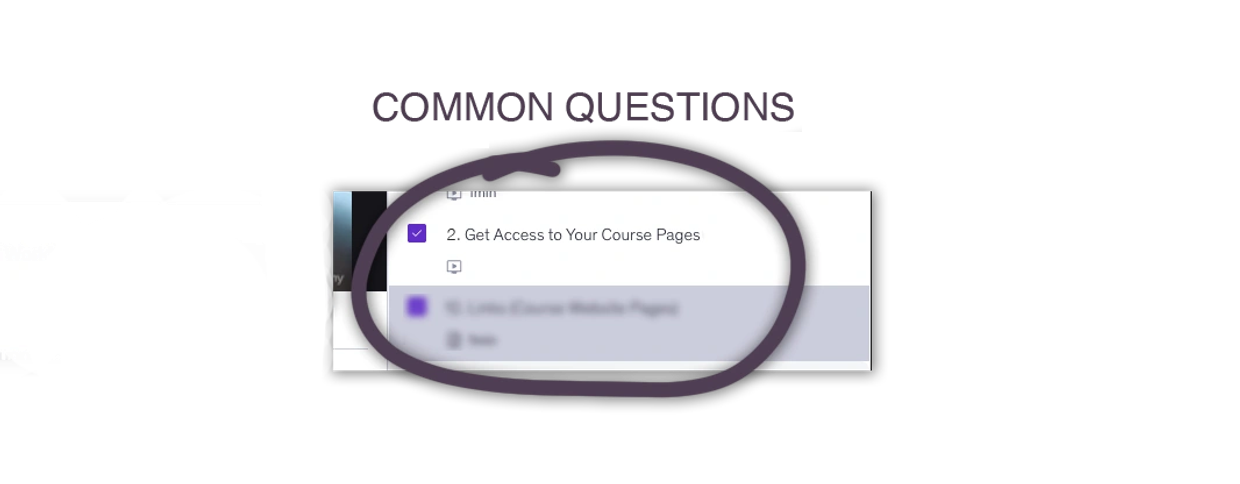
If you’re looking for course pages mentioned in the lessons, you’ll find them shown in the second lecture of the course (in Section 1). They’re also included in your welcome email from Udemy.
Thanks!
AI Video School
Copyright © 2026 AI Video School - All Rights Reserved.